The True Cost of Open Roles: How Slow Hiring Hurts Revenue
Every day a key role remains unfilled, your business carries hidden costs. Headcount gaps mean lost sales, overworked employees, stalled initiatives, and eroded customer satisfaction. On average, unfilled positions cost employers…

Director, Marketing
Every day a key role remains unfilled, your business carries hidden costs. Headcount gaps mean lost sales, overworked employees, stalled initiatives, and eroded customer satisfaction. On average, unfilled positions cost employers thousands per vacancy and across large organizations, the cumulative economic impact can reach millions. For example, the U.S. economy is estimated to lose more than $1 trillion in potential output from unfilled jobs.
In a competitive talent landscape, slow hiring is not just an operational problem, it’s a barrier to revenue and growth. For TA leaders in RPO environments, the question is: how do you turn open roles into filled seats faster, and measure the impact along the way?
The Business Impact of Open Roles
Lost revenue, missed opportunities
A recent analysis puts the average cost of a single unfilled position at more than $4,000 over a 42-day period for typical roles, with an even higher burden of up to $10,00 per month for revenue-generating roles.
In sales or client-facing functions, leaving seats empty can reduce revenue by 5% or more for companies, especially if those roles carry quotas or pipeline responsibilities.
Hidden downstream costs
Unfilled roles also impose costs on teams covering gaps: burnout, overtime, reduced productivity, slower project timelines, and increased error rates.
Strategic initiatives stall. Innovation slows. Customer experience declines when service teams are shorthanded.
Escalating recruiting costs
The longer roles stay open, the more likely TA teams layer on expensive tactics – more job ads, premium job boards, agency support, expedited processing – all while incurring the overhead of internal recruiting operations.
Measuring What Matters: The Role of Recruiting Analytics
To fight this drag, TA leaders need real-time visibility into hiring performance. That’s where recruiting analytics come in. A powerful dashboard should expose metrics like time to fill, cost per hire, fill rate across locations/roles, and bottlenecks so leaders can spot and correct inefficiencies before they cost more.
Recruiting dashboards are increasingly core to strategic hiring. They enable tracking of metrics such as time to fill, time to hire, and cost per hire, and help leaders compare performance across roles or locations.
For instance, dashboards can highlight:
- Roles or locations with unusually long time-to-fill
- Lines of business with escalating cost-per-hire
- Funnel stages where candidates get stuck (e.g. screening to interview)
- Trends in hiring velocity and bottlenecks over time
Enter Personegy’s Analytics Dashboard
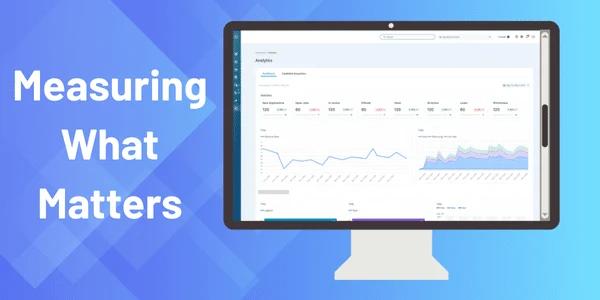
Personegy’s platform isn’t just an execution engine, it backs it with a rich analytics dashboard tailored for high-volume, RPO-style hiring. Here’s how it empowers TA leaders:
1. Monitor cost-per-hire and time-to-fill in real time
Rather than waiting for monthly reports, leaders can see how fast roles are filling and how much each hire costs live. If cost-per-hire spikes or time-to-fill lags, alerts and visual cues help you dig in immediately.
2. View performance across roles, locations, and business units
Personegy gives you a single, clear view of hiring performance across all roles and locations. Spot slow regions, track job families against targets, and skip the hassle of pulling multiple reports. Everything is centralized.
3. Reveal bottlenecks and velocity gaps
By mapping the funnel stages (apply to screen to interview to offer to accept), you can see where the delays are strongest. That insight points you to the right levers, maybe screening, communication, scheduling, or offer turnaround.
4. Drive cost savings and resource reallocation
With clear visibility, you can spot redundant tool spend, underused recruiting channels, or roles with inflated hiring costs. You can redirect budget or process change to the areas that yield the biggest lift.
5. Demonstrate recruiting ROI to stakeholders
Your dashboard becomes your proof. TA leaders no longer justify spend in the dark, they show how faster hiring recoups revenue, reduces vacancy cost, and scales capacity.
How TA Leaders Should Start
- Baseline your current state. Capture your existing time-to-fill and cost-per-hire to contrast improvements.
- Set target benchmarks. Use industry benchmarks or internal goals.
- Start small to prove impact. Roll out Personegy analytics in one department or region first to track improvements before expanding company-wide.
- Take action on what you see. If a location is falling behind, step in – shift resources, refine workflows, or provide extra support to keep hiring on track.
- Expand gradually. Once you see results, roll out the dashboards to additional teams, departments, or regions until they’re used across the entire organization.
From Open Roles to Revenue Engines
Open roles are more than staffing gaps; they’re silent revenue killers draining your growth potential. But TA leaders aren’t powerless. With an analytics-driven strategy and a platform built for speed and insight, you can shift the burden.
Personegy’s dashboard ties hiring metrics to business outcomes. You don’t fill roles blindly, you do so with data, clarity, and intent. In doing so, you turn your recruiting function into a revenue-positive, strategic engine.
If your pipeline is leaking or your roles are dragging, it’s time to turn the lights on and close open seats faster. Because every day matters.